




























 Back
Back
GCD (Grand Central Dispatch) The Anatomy of Thread Management in iOS Development Processes
When developing a mobile app, at some point you inevitably face this question: Why does the screen freeze when the user taps a button? The root cause is usually the same: running a heavy task on the main thread.
The main thread is the critical execution context where the user interface (UI) is rendered and user interactions are processed. Any long-running operation on this thread causes the user to perceive the app as “frozen.” Technically, the app is still running; however, since touch, scrolling, and animation requests cannot be processed, the experience degrades.
In the early stages of my development journey, I experienced this first-hand. On a screen that performed a service call, user interaction would completely break; neither a loading indicator (spinner) would animate nor would the user receive meaningful feedback. When I investigated the cause, the core concept I encountered was GCD (Grand Central Dispatch).
In this article, I will discuss what GCD is, which problems it solves in iOS development, and why it still sits at the core of modern concurrency models—based on both my personal observations and principles widely accepted in the literature. In particular, we will examine Dispatch Queues, Dispatch Groups, Dispatch Semaphores, and Dispatch Sources from both conceptual and practical perspectives.
What Is GCD (Grand Central Dispatch)?
GCD is a low-level, C-based concurrency API that Apple introduced with iOS 4. It can be used directly in Swift and Objective-C projects. Its main goals are:
- Distribute work onto the appropriate threads
- Remove the burden of creating and managing threads from the developer
- Use system resources as efficiently as possible
In terms of how it works, you can think of GCD like this: you simply say “do this in the background”. GCD decides which thread to use, how many threads to create, and how to balance the workload. As emphasized in Apple’s documentation, this abstraction both improves performance and reduces the risk of developer error.
Similarly to the gains achieved in enterprise back-end systems by consolidating multiple requests at a single point (for example, architectures that aim to minimize round trips), GCD improves the user experience on iOS by distributing workload intelligently.
At this point, drawing a parallel with the Multiple Request approach in the BOA architecture we developed at Kuveyt Türk is quite illustrative. In BOA, coordinating multiple services under a single flow on the back end reduces network traffic while improving response times. GCD operates on iOS with a similar principle: by organizing multiple tasks through appropriate queues, it both simplifies thread management and enables more efficient use of system resources.
Core Components of GCD
1. Dispatch Queues
Dispatch queues form the backbone of GCD. Tasks submitted to a queue are executed according to specific rules. When assigning work to a queue, two fundamental decisions are made:
- Execution type: Synchronous (sync) or asynchronous (async)?
- Queue type: Serial or concurrent?
These choices directly affect the app’s performance and behavior.
The Concept of Concurrency
Concurrency is the ability of a system to make progress on more than one task within the same time interval. This concept is critical to understanding how concurrent queues work.
Concurrency is possible even on a single-core processor. The operating system splits work into very small time slices and runs them in turn, which creates the impression that tasks are running simultaneously.
On multi-core systems, tasks can truly run in parallel on different cores. Even then, planning the lifecycle of these tasks and synchronizing them is still addressed under the umbrella of concurrency.
Serial Queue
Serial queues execute tasks one at a time using the FIFO (First In, First Out) principle. The next task does not begin until the current one finishes. This behavior is ideal for operations with sequential dependencies (see Code 1).
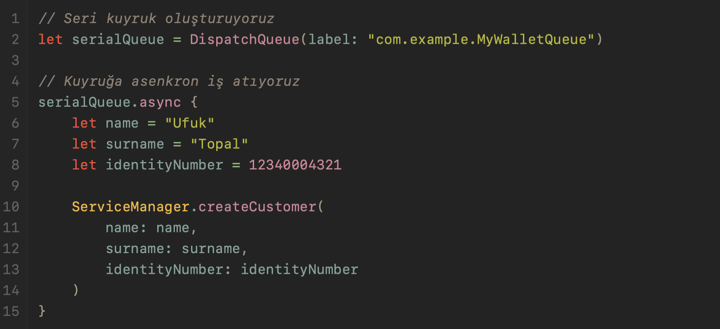
Common use cases include:
- Sequential file write operations
- Operations on the same shared resource that carry a risk of race conditions
Concurrent Queue
On concurrent queues, multiple tasks can run at the same time as system resources allow. The completion order is not guaranteed; what matters is that the tasks are independent of each other (see Code 2).
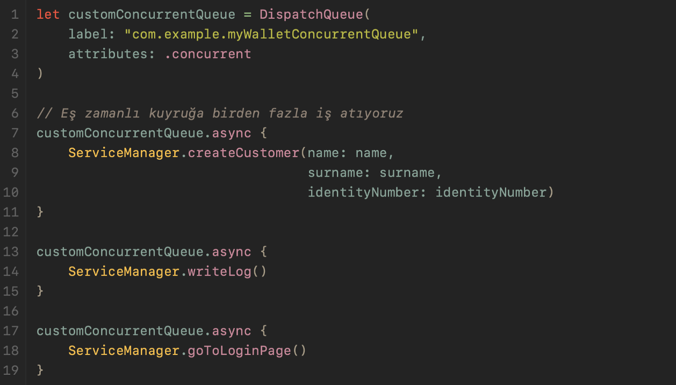
In the example above, creating a customer, writing logs, and navigating to the login screen are completely independent and run concurrently. Without waiting for one to finish, the others continue (see Code 2).
In real projects, using a concurrent queue in scenarios such as running logging, analytics, and network operations in parallel can deliver significant performance gains.
Main Thread and Background Queues
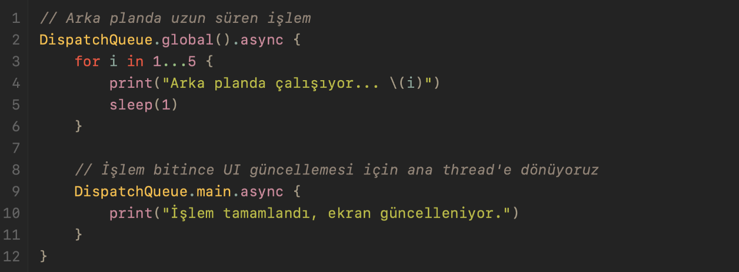
The main thread is the execution context where the app directly interacts with the user. UI rendering, touch events, animations, and screen transitions occur on this thread.
When long-running tasks such as network calls, database queries, or large file operations are executed on the main thread, blocking occurs. Therefore, heavy work should run on background queues, and UI updates should be performed by switching back to the main thread (see Code 3).
2. Dispatch Groups
Dispatch groups make it possible to track—at a single point—when multiple asynchronous operations have completed. Once all operations finish, you can take a single follow-up action (see Code 4).
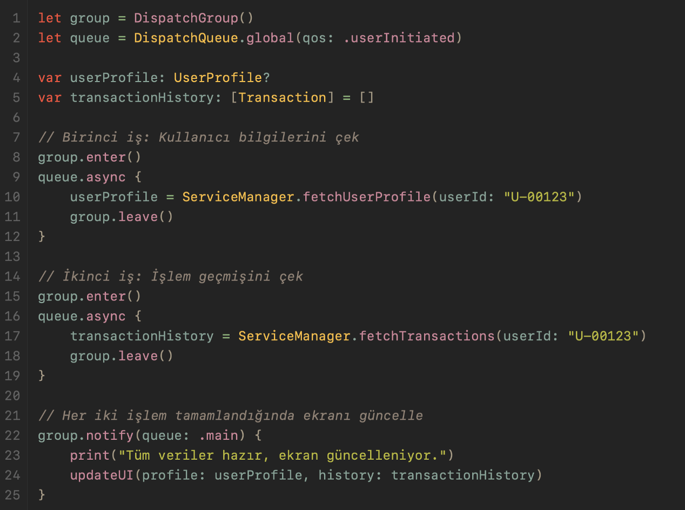
In these structures, remember that for every enter() call there must be a corresponding leave() call.
3. Dispatch Semaphores
Dispatch semaphores control how many tasks can access a shared resource at the same time. This structure is especially useful for limiting access to a resource across many concurrently running tasks (see Code 5).
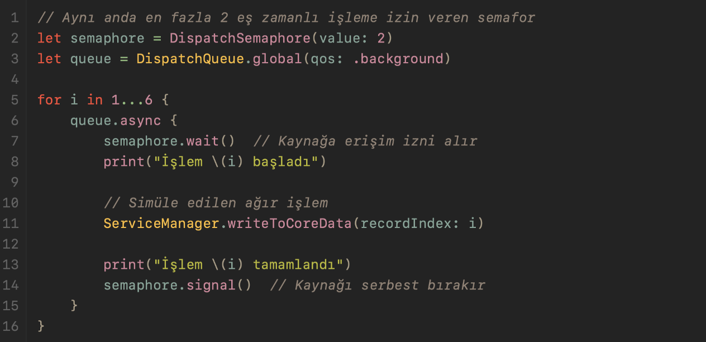
You can think of this structure like a bank teller counter. If there are 2 counters, only 2 customers can be served at the same time; everyone else waits in line. When a customer finishes and leaves, the next customer in line steps up to the counter.
In our projects, this need typically shows up like this: there are 10 concurrent background operations and they all want to write to the same database connection. In such cases, access must be limited to preserve data integrity.
4. Dispatch Sources
Dispatch Sources are perhaps one of the least known yet most powerful features of GCD. They are used to observe system-level events—such as file changes, timers, signals, and process-related events—and react to them.
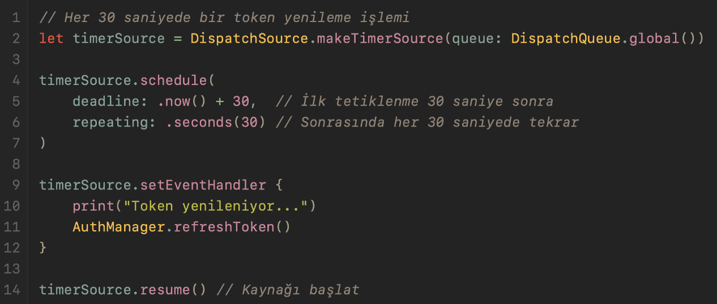
Think of a project where, before the user leaves the app, an automatic save operation must run in the background, or a token refresh needs to be triggered at certain intervals (see Code 6). This is where Dispatch Sources come into play.
Periodic Work with a Timer:
Monitoring File Changes:
We can monitor file system events using a Dispatch Source (see Code 7).
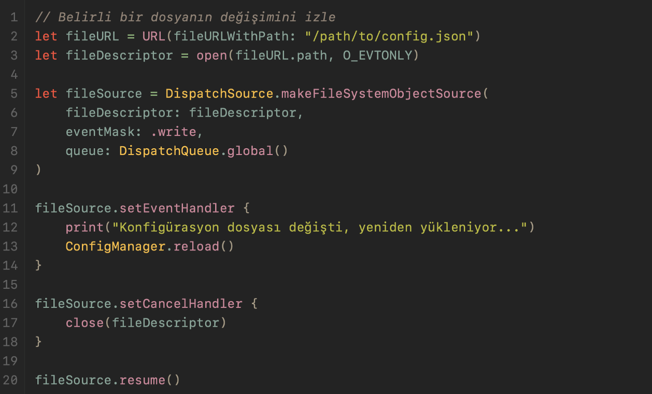
An important point about Dispatch Sources: every started source should be stopped with cancel() when the work is done. Otherwise, memory leaks and unnecessary system resource consumption may occur. I especially recommend making it a habit to clean up your sources in the ViewController’s deinit() method.
Conclusion
GCD is an indispensable building block for performance and user experience in iOS development. As emphasized in Apple’s official documentation, distributing tasks onto appropriate queues and avoiding blocking the main thread directly impacts app responsiveness and perceived performance (see Apple Dispatch Documentation). When the building blocks we covered with code examples (Code 1–7) are used correctly, it is possible to build applications that are both stable and high-performing (see DispatchQueue, DispatchGroup, and Concurrency Programming Guide).
References
- Apple Inc. (2025). Dispatch (Grand Central Dispatch) Documentation. https://developer.apple.com/documentation/dispatch
- Apple Inc. (2025). DispatchQueue. https://developer.apple.com/documentation/dispatch/dispatchqueue
- Apple Inc. (2025). DispatchGroup. https://developer.apple.com/documentation/dispatch/dispatchgroup
- Apple Inc. (2025). DispatchSemaphore. https://developer.apple.com/documentation/dispatch/dispatchsemaphore
- Apple Inc. (2012). Concurrency Programming Guide – Dispatch Sources. https://developer.apple.com/documentation/dispatch/dispatch-source
- Wikipedia Contributors. (2026). Grand Central Dispatch. https://en.wikipedia.org/wiki/Grand_Central_Dispatch
Wishing you clean code! 🚀